Dual Monitor Simultaneous EX712 HDMI Splitter Extender up to RJ45 Splitter Security Camera Simultaneous Ideal for Construction Surveillance and More


Beskrivning
―🔹―🔹―🔹―🔹―🔹―🔹―🔹―🔹―🔹―🔹―🔹―🔹― 🛫【Certified Store on JOOM】 A Japanese seller delivering high-quality products across borders! 📦【Shipped from Japan】 We pack carefully and deliver promptly and securely. 🔍【Strict Inspection Based on Japanese Quality Standards】 Only carefully selected products of excellent quality are delivered. 📒【Japanese Instruction Manual May Be Included】 We recommend using a text recognition app for translation. 🛍️【Some items may be based on international specifications】 Thank you for your kind understanding in advance. 👍【If you are satisfied with the product, please "Follow" our store and leave a review!】 Your support means a lot to us 💖 ―🔹―🔹―🔹―🔹―🔹―🔹―🔹―🔹―🔹―🔹―🔹―🔹― ⚠️【Attention! Please be sure to read before purchasing】⚠️ Does this product match the conditions below? Please check carefully before placing your order. 🔌【Voltage Compatibility】 This product is designed for use in Japan and operates on 90–110V. Using it with a different voltage may cause malfunction or damage. 🔌【Plug Type】 The plug type is Type A or Type B, which is standard in Japan. You may need a plug adapter for use in other countries. 💡【Important Notes on Transformers and Adapters】 🔻 A transformer adjusts the voltage to match your device's requirements. 🔻 A plug adapter only changes the plug shape and does not convert voltage. 👉 Using only a plug adapter without a transformer may damage the product. 🚫【Disclaimer】 We are not responsible for any damage or malfunction caused by improper use without a transformer. ―🔹―🔹―🔹―🔹―🔹―🔹―🔹―🔹―🔹―🔹―🔹―🔹―
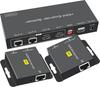
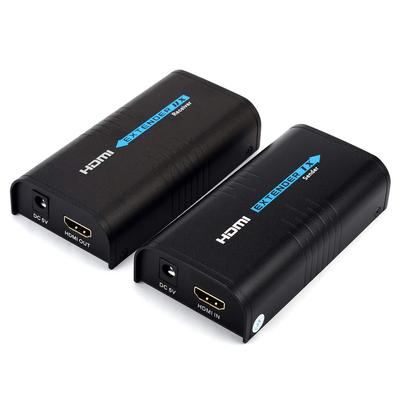
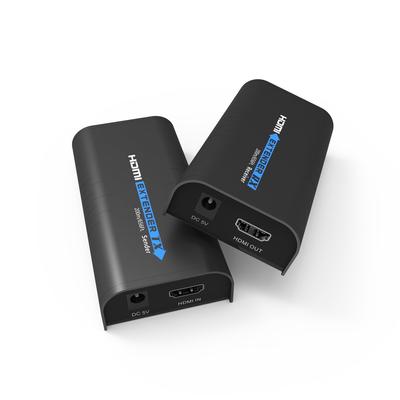
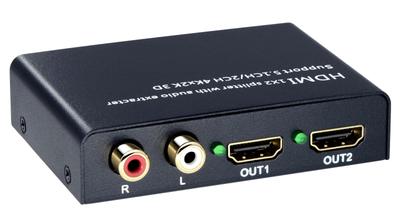
HDMI Distribution Extender EX712: This HDMI LAN extender comes with one transmitter (TX) and two receivers (RX). It has two LAN ports on the output side, allowing you to connect to a CAT6/CAT6A/CAT7 wired LAN. The HDMI LAN extender also has two HDMI ports. It can simultaneously combine video and audio from input devices and display them on up to four TVs/monitors. HDMI LAN Converter Extender 50M Extension: When using the LAN output port, you can extend the source HDMI signal up to 50M. In this case, you must use a CAT6/CAT7 LAN cable. When using the HDMI output port, you must use a standard HDMI cable of 10M or less. Simultaneous output to up to four remote monitors: Equipped with four output ports, it can be connected to up to four output devices. This is an essential item for monitoring rooms, home theaters, hospitals, educational classrooms, factories, and other places where information needs to be viewed on multiple screens. HDMI extender with built-in EDID function prevents output errors: If the HDMI extender/splitter does not have EDID functionality, users must check the display modes of the device and monitor and set the desired mode on each device. If the HDMI extender/splitter has EDID functionality, simply connect the TX and output devices with an HDMI cable and press the EDID button on the TX side for about three seconds. The HDMI extender/splitter will then read the information from the output device and transmit video and audio at the optimal resolution. This HDMI LAN splitter/extender supports a single power supply: Connect the input device (such as a PS4, PC, or security camera) to the HDMI extender and then to the output device using a single CAT6/CAT6A/CAT7 LAN cable. It can project the signal from the input device (such as an HDMI device like a PS4, PC, or security camera) to up to four TVs or monitors at distances up to 50m without compromising video or audio quality. When using the HDMI LAN extender, connect the included DC adapter to the TX (transmitter) to power the HDMI LAN extender. HDMI Extender LAN for clear images up to 50M: Video and audio signals from an HDMI input device can be transmitted to up to four TVs/monitors via the HDMI Extender Splitter.